Reports
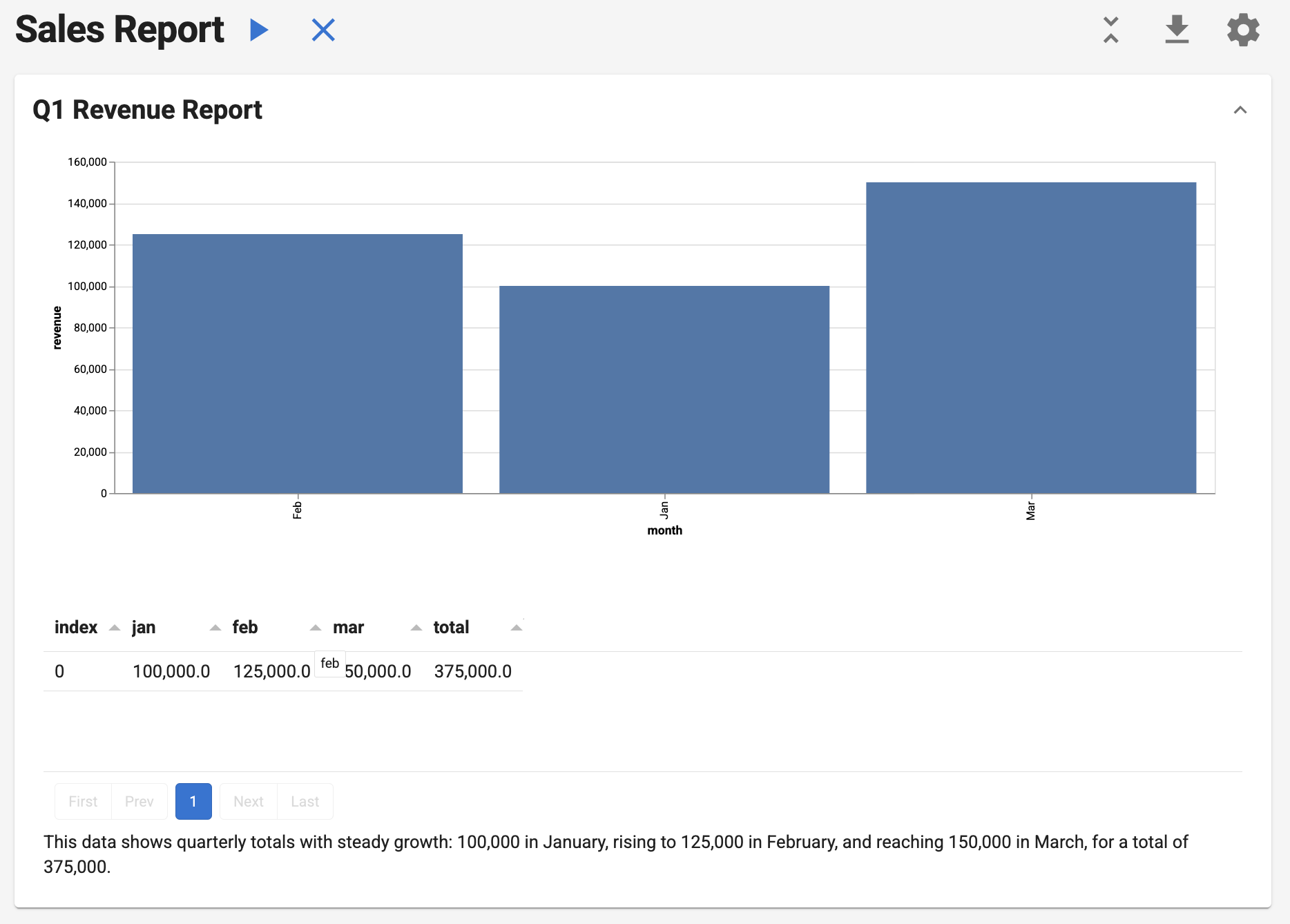
One-click reproducible analytics that combine SQL precision with AI insights.
Reports execute a sequence of tasks, pass data between them, and render as interactive documents. Each report can be executed, exported to notebooks, and deployed as a web application.
Quick Start
Build your first report in minutes. This example loads a small dataset, composes a Section with a custom Action (for visualization) and a SQLQuery (for aggregation), passes results through shared context, and renders an interactive Vega-Lite chart. Run it locally, export to a notebook, or serve it as a web app.
import pandas as pd
import panel as pn

from lumen.ai.llm import OpenAI
from lumen.ai.report import Action, Report, Section
from lumen.ai.actions import SQLQuery
from lumen.pipeline import Pipeline
from lumen.sources.duckdb import DuckDBSource
from lumen.views import VegaLiteView

pn.extension("vega")


class MonthlyRevenue(Action):
    async def _execute(self, context, **kwargs):
        df = pd.DataFrame({"month": ["Jan", "Feb", "Mar"], "revenue": [100000, 125000, 150000]})
        source = DuckDBSource.from_df(tables={"q1": df})
        pipeline = Pipeline(source=source, table="q1")
        chart = VegaLiteView(
            pipeline=pipeline,
            spec={
                "$schema": "https://vega.github.io/schema/vega-lite/v5.json",
                "mark": "bar",
                "encoding": {"x": {"field": "month", "type": "ordinal"}, "y": {"field": "revenue", "type": "quantitative"}},
                "width": "container",
            },
            sizing_mode="stretch_width",
            height=400,
        )
        return [chart], {"source": source}


report = Report(
    Section(
        MonthlyRevenue(title="Monthly Revenue"),
        SQLQuery(
            sql_expr="""
            SELECT
            SUM(CASE WHEN month = 'Jan' THEN revenue ELSE 0 END) AS jan,
            SUM(CASE WHEN month = 'Feb' THEN revenue ELSE 0 END) AS feb,
            SUM(CASE WHEN month = 'Mar' THEN revenue ELSE 0 END) AS mar,
            SUM(revenue) AS total
            FROM q1
        """,
            table="q1_total",
            llm=OpenAI(),
        ),
        title="Q1 Revenue Report",
    ),
    title="Sales Report",
)

await report.execute()
report.show()
Structure
Reports follow a three-level hierarchy:
Why Reports?
| Pain Point | How Reports Solve It |
|---|---|
| "Our weekly metrics are generated manually" | Automate with one-click execution |
| "Analysis isn't reproducible" | Same inputs → same outputs, every time |
| "Can't share analysis with non-coders" | Export to Jupyter notebooks instantly |
| "AI analysis is inconsistent" | Combine deterministic SQL with AI insights |
| "Reports are siloed in notebooks" | Serve as interactive web apps |
Report is the top-level container with controls to execute, clear, collapse/expand, export, and configure. Section groups related tasks as collapsible accordions. Task is a unit of work.
Task Types
SQLQuery
No custom code needed—just SQL:
from lumen.ai.actions import SQLQuery
from lumen.ai.llm import OpenAI
from lumen.sources.duckdb import DuckDBSource

source = DuckDBSource(uri="sales.db")

SQLQuery(
    source=source,
    table="sales_summary",
    sql_expr="SELECT region, SUM(amount) as total FROM sales GROUP BY region",
    title="Sales by Region",
    llm=OpenAI()  # Required for AI-generated captions
)
Outputs source, pipeline, data, metaset, and table to context for downstream tasks.
Action
Subclass Action for custom Python logic:
from lumen.ai.report import Action
from panel.pane import Markdown

class MyAction(Action):
    async def _execute(self, context, **kwargs):
        result = do_something()
        return [Markdown(f"Result: {result}")], {"my_result": result}
Return (outputs, context_updates). Use [] for no outputs, {} for no context updates.
Example:
import panel as pn
from lumen.ai.report import Action, Report, Section
from lumen.ai.editors import LumenEditor
from lumen.pipeline import Pipeline
from lumen.sources.duckdb import DuckDBSource
from lumen.views.base import VegaLiteView

pn.extension("tabulator", "vega")

class LoadDataAction(Action):
    async def _execute(self, context, **kwargs):
        source = DuckDBSource(tables={"penguins": "https://datasets.holoviz.org/penguins/v1/penguins.csv"})
        pipeline = Pipeline(source=source, table="penguins")
        return [pipeline.__panel__()], {"source": source}

class AnalyzeAction(Action):
    async def _execute(self, context, **kwargs):
        source = context["source"]
        avg_source = source.create_sql_expr_source(
            tables={"avg_data": "SELECT species, AVG(CAST(NULLIF(body_mass_g, 'NA') AS DOUBLE)) AS avg_mass FROM penguins GROUP BY species"}
        )
        pipeline = Pipeline(source=avg_source, table="avg_data")
        chart = VegaLiteView(
            pipeline=pipeline,
            spec={
                "$schema": "https://vega.github.io/schema/vega-lite/v5.json",
                "mark": "bar",
                "encoding": {
                    "x": {"field": "species", "type": "nominal"},
                    "y": {"field": "avg_mass", "type": "quantitative"},
                },
            },
            sizing_mode="stretch_width",
        )
        return [LumenEditor(component=chart, title="Avg Body Mass by Species")], {}

report = Report(
    Section(LoadDataAction(title="Load"), AnalyzeAction(title="Analyze"), title="Penguins")
)
report.show()
ActorTask
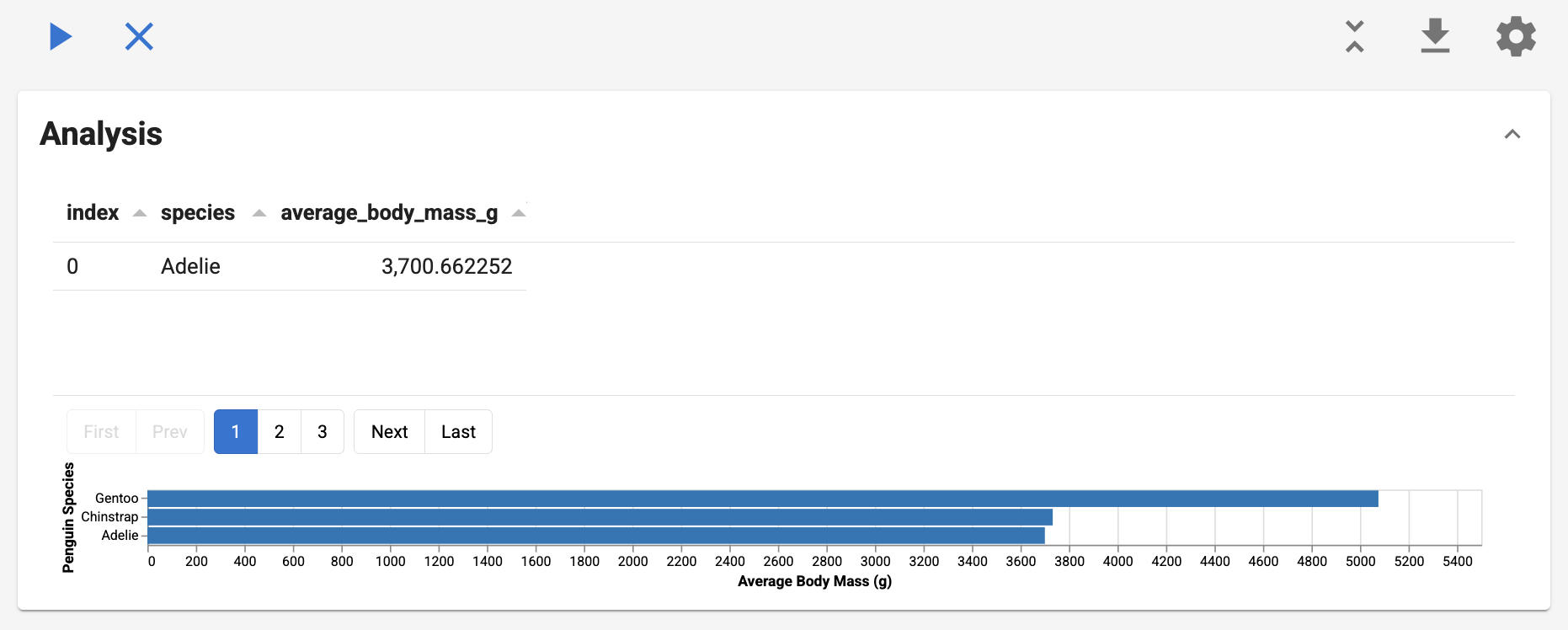
Wrap any Agent for LLM-powered analysis:
from lumen.ai.report import ActorTask
from lumen.ai.agents import SQLAgent, ChatAgent

Section(
    ActorTask(SQLAgent(), title="Query", instruction="Get sales by region"),
    ActorTask(ChatAgent(), title="Summarize", instruction="Explain the trends"),
)
from lumen.ai.report import ActorTask, Report, Section
from lumen.ai.agents import SQLAgent, VegaLiteAgent
from lumen.sources.duckdb import DuckDBSource
from lumen.ai.schemas import get_metaset
from lumen.ai.llm import OpenAI

llm = OpenAI()
source = DuckDBSource(tables={"penguins": "https://datasets.holoviz.org/penguins/v1/penguins.csv"})
metaset = await get_metaset([source], tables=source.get_tables())

report = Report(
    Section(
        ActorTask(
            SQLAgent(llm=llm),
            title="Query Data",
            instruction="Get average body mass by species",
            context={"source": source, "sources": [source], "metaset": metaset}
        ),
        ActorTask(
            VegaLiteAgent(llm=llm),
            instruction="Create a bar chart of the results",
            context={},
        ),
        title="Analysis",
    )
)
await report.execute()
report.show()
Choosing the Right Type
| Scenario | Use |
|---|---|
| Known SQL query | SQLQuery — fastest, no LLM call |
| Natural language → SQL | ActorTask + SQLAgent |
| Interpretation, summaries | ActorTask + ChatAgent |
| Custom Python logic | Action |
Best Practices
Action granularity: Group by analytical question, not output type. One action can return multiple outputs (table + chart + summary).
Section organization: Each section answers one business question. Keep 2-5 related tasks per section.
Context flow: Pass derived metrics, not just raw data. Use descriptive keys (total_revenue not val).
AI instructions: Be specific about format and scope:
# ❌ Vague
ActorTask(ChatAgent(), instruction="Analyze the data")

# ✅ Specific
ActorTask(ChatAgent(), instruction="""
Based on the metrics above:
1. Top 3 trends (bullet points)
2. Top 3 risks (High/Medium/Low)
Keep under 200 words.
""")
Error handling: Use abort_on_error=True (default) for dependent tasks, abort_on_error=False for independent analyses that shouldn't block each other.
Performance: Prefer SQLQuery over ActorTask for known queries. Use prepare() for expensive one-time setup.
Context
Tasks communicate through a shared context dictionary.
Declaring dependencies with schemas:
from lumen.ai.context import ContextModel
from typing import NotRequired

class MyInputs(ContextModel):
    pipeline: object        # Required
    sql: NotRequired[str]   # Optional

class MyAction(Action):
    input_schema = MyInputs

    async def _execute(self, context, **kwargs):
        pipeline = context["pipeline"]
        return [], {}
Invalidation: When a task's output changes, downstream tasks automatically re-run. Manually invalidate with report.invalidate(["key"]).
Running and Exporting
UI controls: Execute (▶), Clear (✕), Collapse/Expand, Export (↓), Settings (⚙)
Run locally:
Deploy:
Export to notebook:
Validate before running:
from lumen.ai.context import ContextError

try:
    report.validate(context={"source": my_source})
except ContextError as e:
    print(f"Missing dependencies: {e}")
Modifying Reports
section.append(NewAction())
section.insert(0, FirstAction())
section.remove(old_action)
report1.merge(report2)
Lifecycle Methods
| Method | Purpose |
|---|---|
prepare(context) |
Async setup before first execution |
_execute(context) |
Your implementation |
reset() |
Clear outputs |
cleanup() |
Final cleanup on removal |
Troubleshooting
| Problem | Solution |
|---|---|
| "Task has unmet requirements" | Add a task that provides the required context key, or mark field as NotRequired |
| Context not updating | Return a tuple: return [output], {"key": value} |
| Notebook export fails | Call execute() before to_notebook() |
| SQLQuery shows no caption | Pass an llm parameter |