User Interface
Configure the Lumen AI chat interface.
ChatUI vs ExplorerUI
Lumen provides two interfaces:
- ExplorerUI - Split view with table explorer, multiple explorations, and a navigation tree. Best for most use cases.
- ChatUI - Simple chat-only interface. Best for embedded applications.
Use ExplorerUI unless you specifically need the simpler ChatUI.
Basic configuration
Common parameters
Load data
Configure LLM
Add agents
ui = lmai.ExplorerUI(
    data='penguins.csv',
    agents=[MyCustomAgent()]  # Adds to 8 default agents
)
Add tools
ui = lmai.ExplorerUI(
    data='penguins.csv',
    tools=[my_function]  # Functions become tools automatically
)
Change title
Custom suggestions
ui = lmai.ExplorerUI(
    data='penguins.csv',
    suggestions=[
        ("search", "What data is available?"),
        ("bar_chart", "Show trends"),
    ]  # (1)!
)
- Tuples of (Material icon name, button text)
Advanced parameters
Enable chat logging
ui = lmai.ExplorerUI(
    data='penguins.csv',
    logs_db_path='logs.db'  # SQLite database for all messages
)
Configure coordinator
ui = lmai.ExplorerUI(
    data='penguins.csv',
    coordinator_params={
        'verbose': True,
        'validation_enabled': False
    }
)
Custom file handlers
def handle_hdf5(file_bytes, alias, filename):
    # Process file and add to source
    return True

ui = lmai.ExplorerUI(
    data='penguins.csv',
    table_upload_callbacks={'hdf5': handle_hdf5}
)
Provide initial context
ui = lmai.ExplorerUI(
    data='penguins.csv',
    context={'company': 'Acme', 'year': 2024}  # (1)!
)
- Available to all agents
Custom notebook export
ui = lmai.ExplorerUI(
    data='penguins.csv',
    notebook_preamble='# Analysis by Data Team\n# Generated: 2024'
)
Custom source controls
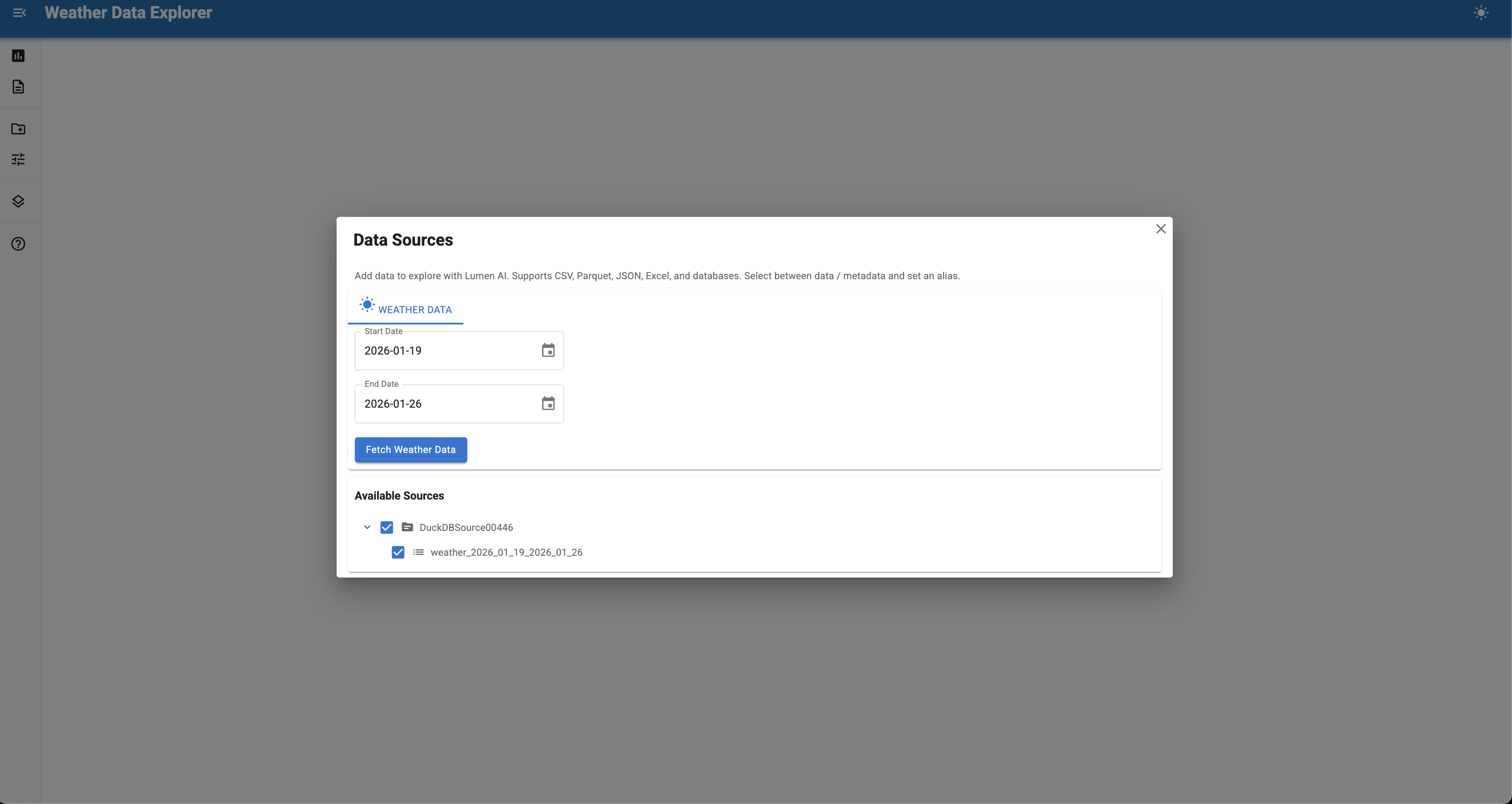
Source controls provide UI interfaces for loading data from external services.
Controls let users interactively fetch data from APIs, databases, or specialized sources directly in the Lumen UI sidebar. They're essential for integrating external data that isn't available as static files or database connections.
Why use source controls?
Source controls solve common data integration challenges:
- External APIs - Fetch data from REST APIs that require parameters or authentication
- User selection - Let users pick data subsets (years, regions, variables) before loading
- Dynamic data - Access real-time or frequently updated data sources
- Complex workflows - Handle multi-step data fetching and transformation
- Authentication - Manage API keys or credentials securely
Built-in controls
| Control | Use for |
|---|---|
UploadControls |
Uploading local files (CSV, Excel, etc.) |
DownloadControls |
Fetching data from URLs or building custom controls |
Key components
Inherited from BaseSourceControls
| Component | Purpose |
|---|---|
_error_placeholder |
Show error messages |
_message_placeholder |
Show success messages |
_progress_bar |
Loading indicator (or use loading=True on layout) |
_progress_description |
Progress text |
_count |
Counter for unique source names |
outputs |
Dict to store created sources |
Required implementation steps
- Define parameters - Use
paramtypes for user inputs - Build UI - Create widgets with Panel or Material-UI components
- Fetch data - Use
asyncio.to_thread()for blocking API calls - Register source - Create DuckDB source with
from_df() - Update outputs - Set
outputsdict and trigger events
Complete minimal example
import asyncio
import pandas as pd
import panel as pn
import param
import lumen.ai as lmai
from datetime import date, timedelta
from lumen.ai.controls import DownloadControls
from lumen.sources.duckdb import DuckDBSource
from lumen.util import normalize_table_name
from panel_material_ui import Button, DatePicker, Column

pn.extension()


class WeatherControl(DownloadControls):
    """Fetch weather data from Iowa Environmental Mesonet."""

    start_date = param.Date(default=date.today() - timedelta(days=7))
    end_date = param.Date(default=date.today())

    label = '<span class="material-icons">wb_sunny</span> Weather Data'

    def __init__(self, **params):
        super().__init__(**params)

        self._start_picker = DatePicker.from_param(
            self.param.start_date,
            label="Start Date"
        )
        self._end_picker = DatePicker.from_param(
            self.param.end_date,
            label="End Date"
        )
        self._fetch_button = Button(
            label="Fetch Weather Data",
            on_click=self._on_fetch
        )
        self._layout = Column(
            self._start_picker,
            self._end_picker,
            self._fetch_button
        )

    async def _on_fetch(self, event):
        """Fetch weather data from API."""
        with self._layout.param.update(loading=True):
            await asyncio.sleep(0.01)

            # Build API URL
            url = (
                f"https://mesonet.agron.iastate.edu/cgi-bin/request/daily.py?"
                f"stations=OAK&"
                f"sts={self.start_date.strftime('%Y-%m-%d')}&"
                f"ets={self.end_date.strftime('%Y-%m-%d')}&"
                f"network=CA_ASOS&format=csv"
            )

            # Fetch data
            df = await asyncio.to_thread(pd.read_csv, url)

            if df is not None and not df.empty:
                await self._add_table(df)
                self.param.trigger("upload_successful")

    async def _add_table(self, df):
        """Register DataFrame as DuckDB source."""
        table_name = normalize_table_name(
            f"weather_{self.start_date}_{self.end_date}"
        )
        source = DuckDBSource.from_df(tables={table_name: df})
        source.tables[table_name] = f"SELECT * FROM {table_name}"

        self.outputs["source"] = source
        self.outputs["sources"] = self.outputs.get("sources", []) + [source]
        self.outputs["table"] = table_name
        self.param.trigger("outputs")

    def __panel__(self):
        return self._layout


ui = lmai.ExplorerUI(
    source_controls=[WeatherControl],
    title="Weather Data Explorer",
)
ui.servable()
This example fetches real weather data from the Iowa Environmental Mesonet for Oakland, CA. Users can select date ranges and immediately query the data with natural language.
Best practices
- Use
asyncio.to_thread()instead ofrun_in_executor()for blocking calls - Show loading state with
loading=Trueon the layout or use progress bars - Handle errors gracefully and display messages to users
- Add metadata to sources to help LLM agents understand the data
- Validate inputs before making expensive API calls
- Cache API responses when possible to avoid redundant calls
- Normalize table names with
normalize_table_name()to ensure DuckDB compatibility - Use dynamic table names that include parameters for clarity
- Bind widgets with
from_param()for cleaner code
Complete example
All parameters
Quick reference:
| Parameter | Type | Purpose |
|---|---|---|
data |
str/Path/Source/list | Data sources to load |
llm |
Llm | LLM provider (default: OpenAI) |
agents |
list | Additional agents |
analyses |
list | Custom analyses |
context |
dict | Initial context |
coordinator |
type | Planner or DependencyResolver |
coordinator_params |
dict | Coordinator configuration |
default_agents |
list | Replace default agents |
demo_inputs |
list | Demo prompts for the coordinator |
document_vector_store |
VectorStore | Vector store for document tools |
export_functions |
dict | Map exporter names to export functions |
interface |
type | Chat interface class |
llm_choices |
list | LLM model choices shown in Settings |
log_level |
str | DEBUG/INFO/WARNING/ERROR |
logfire_tags |
list | Log LLM calls to Logfire with tags |
logs_db_path |
str | Chat logging database path |
notebook_preamble |
str | Export header |
provider_choices |
dict | LLM providers shown in Settings |
source_controls |
list | Source control components for data |
suggestions |
list | Quick action buttons |
title |
str | App title |
tools |
list | Custom tools |
upload_handlers |
dict | File extension upload handlers |
vector_store |
VectorStore | Vector store for non-doc tools |
See parameter docstrings in code for complete details.
See also
- Data Sources — File and database connections
- Tools — Custom functions for agents
- Building a Census Data Explorer — Complete walkthrough with minimal and full examples