Building a SaaS Executive Dashboard
Executive dashboards often start as one-off analyses that become recurring requests—"Can you update the metrics for Monday's meeting?" turns into hours of manual work each week. Lumen Reports solves this by making dashboards reproducible with a single click: define your queries and visualizations once, then execute them whenever you need fresh results.
This tutorial builds an executive dashboard for CloudSync, a fictional B2B SaaS company. You'll combine SQL queries for precise metrics, custom visualizations for trends, and AI-generated insights—all exportable as Jupyter notebooks or deployable as web apps.
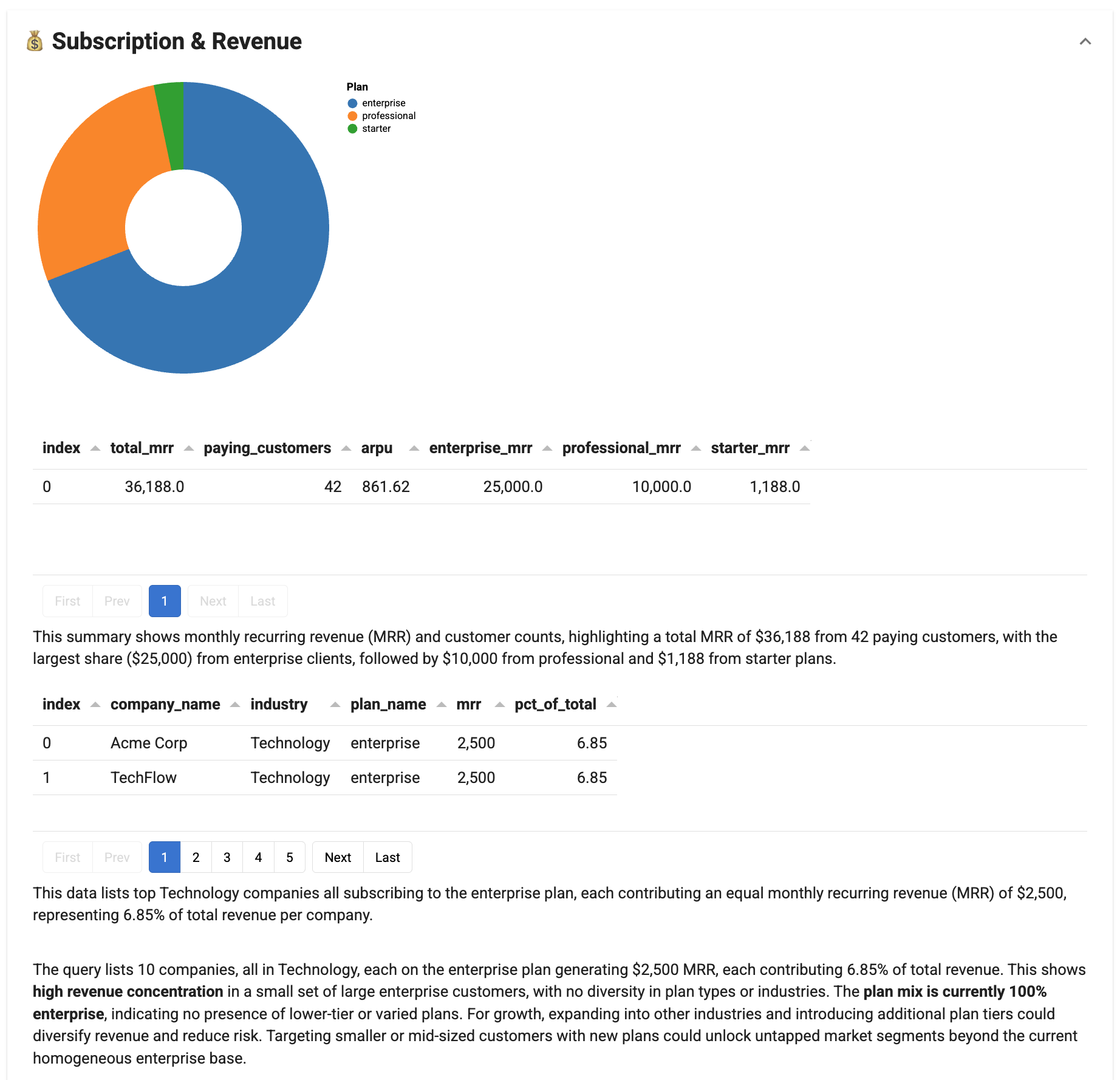
Final result
Time: 15-20 minutes
What you'll build
An interactive executive dashboard with three collapsible sections that combine SQL queries, custom visualizations, and AI-generated insights. The tutorial walks through setting up a DuckDB data source, creating custom Actions for visualizations, adding SQLQuery tasks for deterministic metrics, integrating ChatAgent for AI insights, and assembling everything into a deployable report. Each step introduces key Lumen Reports concepts with links to detailed configuration guides.
Prerequisites
Install the required packages:
1. DuckDB provides in-memory data for prototyping
DuckDBSource connects to databases or creates sources from DataFrames. The sample data below represents a typical SaaS company—in production, you would connect to your actual database.
Key concepts: DuckDBSource connects to DuckDB databases or creates in-memory sources from DataFrames (see Sources configuration). The from_df() method creates a source from pandas DataFrames for prototyping.
| saas_dashboard.py | |
|---|---|
1 2 3 4 5 6 7 8 9 10 11 12 13 14 15 16 17 18 19 20 21 22 23 24 25 26 27 28 29 30 31 32 33 34 35 36 37 38 39 40 41 42 43 44 45 46 47 48 49 50 51 52 53 54 55 56 57 58 59 60 61 62 63 64 65 66 67 68 69 70 71 72 73 74 75 76 77 78 79 80 81 82 83 84 85 86 87 88 89 90 91 92 93 94 95 96 97 98 99 100 101 102 103 | |
- The LLM is used for AI-generated captions on
SQLQueryand insights fromChatAgent
2. Custom Actions enable specialized visualizations
Actions let you write custom Python logic for specialized visualizations. The CustomerAcquisitionChart below shows growth trends by subclassing Action and implementing _execute.
Key concepts: Custom Actions extend Lumen Reports by subclassing Action (see Reports configuration). The _execute method contains visualization logic and returns (outputs, context_updates). Tasks communicate through a shared context dictionary. LumenEditor wraps components with titles for the report UI.
- Access shared data from the context dictionary
- Return a tuple of
(outputs, context_updates)— use{}when not updating context
MRR donut chart shows revenue distribution by plan
Headcount bar chart shows team composition
3. SQLQuery executes deterministic metrics without custom code
SQLQuery provides SQL execution with AI-generated captions—use it for known metrics that don't require custom visualization logic.
Key concepts: SQLQuery executes SQL and displays results as tables (see Reports configuration). The llm parameter enables AI-generated captions explaining the results. The source parameter specifies the data source to query against.
| saas_dashboard.py | |
|---|---|
243 244 245 246 247 248 249 250 251 252 253 254 255 256 257 258 259 260 261 262 263 264 265 266 267 268 269 270 271 272 273 274 275 276 277 278 279 280 281 282 283 284 285 286 287 288 289 290 291 292 293 294 295 296 297 298 299 300 301 302 303 304 305 306 307 308 309 310 311 312 313 314 315 316 317 318 319 320 321 322 323 324 325 326 327 328 329 330 331 332 333 334 335 336 337 338 339 340 341 342 343 344 345 346 347 348 349 350 351 352 353 354 355 356 357 358 359 360 361 | |
4. ActorTask wraps agents for AI-powered analysis
ActorTask wraps any Agent for use in Reports. ChatAgent generates narrative insights based on the data.
Key concepts: ActorTask wraps any Agent for use in Reports (see Reports configuration). ChatAgent generates natural language responses. The instruction parameter guides the AI on what to analyze and how to format the response.
5. Report and Section containers organize tasks into collapsible groups
Report is the top-level container with controls to execute, export, and configure. Sections group related tasks as collapsible accordions.
Key concepts: Report is the top-level container with execution, export, and configuration controls. Section groups related tasks as collapsible accordions. The context parameter shares data across all tasks in the report. Task ordering matters—each task can access outputs from previous tasks.
- The
contextparameter makessourceavailable to all tasks viacontext["source"]
Run the dashboard with Panel serve
Your browser opens to the executive dashboard. The controls at the top let you execute all sections (▶), clear outputs (✕), export to Jupyter notebook (↓), and configure options (⚙). Click section headers to expand or collapse each area.
Complete code
"""
CloudSync Executive Dashboard
Build a one-click reproducible analytics dashboard using Lumen Reports.
"""
import pandas as pd
import panel as pn
from lumen.ai.llm import OpenAI
from lumen.ai.report import Action, Report, Section, ActorTask
from lumen.ai.actions import SQLQuery
from lumen.ai.agents import ChatAgent
from lumen.ai.editors import LumenEditor
from lumen.pipeline import Pipeline
from lumen.sources.duckdb import DuckDBSource
from lumen.views import VegaLiteView
pn.extension("tabulator", "vega")
# =============================================================================
# DATA SOURCE
# =============================================================================
customers_df = pd.DataFrame({
"customer_id": [f"C{str(i).zfill(4)}" for i in range(1, 51)],
"company_name": [
"Acme Corp", "TechFlow", "DataPrime", "CloudNine", "SyncWave",
"ByteForce", "NetSphere", "CodeCraft", "InfoPulse", "DigiCore",
"WebMatrix", "AppVault", "LogicHub", "CyberEdge", "PixelWorks",
"StreamLine", "NodeStack", "ApiFirst", "DevOps Inc", "ScaleUp Co",
"GrowthLab", "StartupXYZ", "InnovateCo", "FutureTech", "SmartSys",
"RapidDev", "AgileTeam", "SprintCo", "LaunchPad", "RocketFuel",
"TurboCode", "FastTrack", "QuickByte", "SwiftApp", "ZoomData",
"FlashNet", "InstantIO", "RealTime", "LiveSync", "HotDeploy",
"CoolStack", "FreshCode", "NewWave", "NextGen", "TopTier",
"EliteTech", "PrimeSoft", "AlphaNet", "BetaLabs", "GammaSys"
],
"industry": (["Technology"] * 15 + ["Healthcare"] * 10 + ["Finance"] * 10 +
["Retail"] * 8 + ["Manufacturing"] * 7),
"signup_date": pd.to_datetime([
"2023-01-15", "2023-02-20", "2023-02-28", "2023-03-10", "2023-03-22",
"2023-04-05", "2023-04-18", "2023-05-01", "2023-05-15", "2023-06-01",
"2023-06-20", "2023-07-08", "2023-07-25", "2023-08-12", "2023-08-30",
"2023-09-15", "2023-09-28", "2023-10-10", "2023-10-25", "2023-11-05",
"2023-11-20", "2023-12-01", "2023-12-15", "2024-01-08", "2024-01-22",
"2024-02-05", "2024-02-19", "2024-03-04", "2024-03-18", "2024-04-01",
"2024-04-15", "2024-05-01", "2024-05-15", "2024-06-01", "2024-06-15",
"2024-07-01", "2024-07-15", "2024-08-01", "2024-08-15", "2024-09-01",
"2024-09-15", "2024-10-01", "2024-10-15", "2024-11-01", "2024-11-15",
"2024-12-01", "2024-12-15", "2025-01-05", "2025-01-10", "2025-01-15"
]),
"region": (["North America"] * 20 + ["Europe"] * 15 +
["Asia Pacific"] * 10 + ["Latin America"] * 5),
"company_size": (["enterprise"] * 10 + ["smb"] * 25 + ["startup"] * 15),
"status": (["active"] * 42 + ["churned"] * 5 + ["trial"] * 3)
})
subscriptions_df = pd.DataFrame({
"subscription_id": [f"S{str(i).zfill(4)}" for i in range(1, 51)],
"customer_id": [f"C{str(i).zfill(4)}" for i in range(1, 51)],
"plan_name": (["enterprise"] * 10 + ["professional"] * 20 + ["starter"] * 20),
"mrr": ([2500] * 10 + [500] * 20 + [99] * 20),
"start_date": customers_df["signup_date"].tolist(),
"end_date": [None] * 45 + ["2024-12-01"] * 5,
"billing_cycle": (["annual"] * 15 + ["monthly"] * 35)
})
employees_df = pd.DataFrame({
"employee_id": [f"E{str(i).zfill(3)}" for i in range(1, 36)],
"name": [
"Alice Chen", "Bob Smith", "Carol Davis", "Dan Wilson", "Eva Martinez",
"Frank Brown", "Grace Lee", "Henry Taylor", "Ivy Anderson", "Jack Thomas",
"Kate Johnson", "Leo Garcia", "Mia Robinson", "Noah Clark", "Olivia Lewis",
"Paul Walker", "Quinn Hall", "Rose Allen", "Sam Young", "Tina King",
"Uma Wright", "Vic Scott", "Wendy Green", "Xavier Adams", "Yara Baker",
"Zack Nelson", "Amy Hill", "Ben Moore", "Chloe Jackson", "Derek White",
"Emma Harris", "Felix Martin", "Gina Thompson", "Hugo Garcia", "Iris Lee"
],
"department": (["engineering"] * 14 + ["sales"] * 8 +
["support"] * 7 + ["marketing"] * 6),
"role": (
["Senior Engineer"] * 4 + ["Engineer"] * 6 + ["Junior Engineer"] * 4 +
["Sales Director"] * 2 + ["Account Executive"] * 6 +
["Support Lead"] * 2 + ["Support Specialist"] * 5 +
["Marketing Manager"] * 2 + ["Marketing Specialist"] * 4
),
"hire_date": pd.to_datetime([
"2022-01-15", "2022-03-01", "2022-06-15", "2022-09-01", "2023-01-10",
"2023-02-15", "2023-04-01", "2023-05-15", "2023-07-01", "2023-08-15",
"2023-09-01", "2023-10-15", "2023-11-01", "2023-12-01", "2024-01-15",
"2024-02-01", "2024-03-15", "2024-04-01", "2024-05-01", "2024-06-01",
"2024-07-01", "2024-08-01", "2024-09-01", "2024-09-15", "2024-10-01",
"2024-10-15", "2024-11-01", "2024-11-15", "2024-12-01", "2024-12-15",
"2025-01-02", "2025-01-05", "2025-01-08", "2025-01-10", "2025-01-12"
]),
"salary": (
[150000] * 4 + [120000] * 6 + [85000] * 4 +
[140000] * 2 + [95000] * 6 +
[90000] * 2 + [55000] * 5 +
[110000] * 2 + [70000] * 4
),
"status": ["active"] * 33 + ["on_leave"] * 2
})
source = DuckDBSource.from_df(tables={
"customers": customers_df,
"subscriptions": subscriptions_df,
"employees": employees_df
})
llm = OpenAI()
# =============================================================================
# CUSTOM ACTIONS
# =============================================================================
class CustomerAcquisitionChart(Action):
"""Visualize customer acquisition trends by company size."""
async def _execute(self, context, **kwargs):
src = context["source"]
acquisition_src = src.create_sql_expr_source(tables={
"acquisition": """
SELECT
DATE_TRUNC('month', signup_date) AS month,
company_size,
COUNT(*) AS new_customers
FROM customers
WHERE status != 'churned'
GROUP BY month, company_size
ORDER BY month
"""
})
pipeline = Pipeline(source=acquisition_src, table="acquisition")
chart = VegaLiteView(
pipeline=pipeline,
spec={
"$schema": "https://vega.github.io/schema/vega-lite/v5.json",
"mark": "bar",
"encoding": {
"x": {"field": "month", "type": "temporal", "title": "Month"},
"y": {"field": "new_customers", "type": "quantitative",
"title": "New Customers"},
"color": {
"field": "company_size",
"type": "nominal",
"title": "Segment",
"scale": {"scheme": "tableau10"}
}
},
"width": "container",
"height": 300
},
sizing_mode="stretch_width",
height=350
)
return [LumenEditor(component=chart, title="Customer Acquisition by Segment")], {}
class MRRDonutChart(Action):
    """Visualize MRR distribution by plan as a donut chart."""

    async def _execute(self, context, **kwargs):
        src = context["source"]

        mrr_src = src.create_sql_expr_source(tables={
            "mrr_by_plan": """
                SELECT
                    s.plan_name,
                    SUM(s.mrr) AS total_mrr,
                    COUNT(*) AS subscriptions
                FROM subscriptions s
                JOIN customers c ON s.customer_id = c.customer_id
                WHERE c.status = 'active' AND s.end_date IS NULL
                GROUP BY s.plan_name
            """
        })

        pipeline = Pipeline(source=mrr_src, table="mrr_by_plan")

        chart = VegaLiteView(
            pipeline=pipeline,
            spec={
                "$schema": "https://vega.github.io/schema/vega-lite/v5.json",
                "mark": {"type": "arc", "innerRadius": 60},
                "encoding": {
                    "theta": {"field": "total_mrr", "type": "quantitative"},
                    "color": {
                        "field": "plan_name",
                        "type": "nominal",
                        "title": "Plan",
                        "scale": {"scheme": "category10"}
                    },
                    "tooltip": [
                        {"field": "plan_name", "title": "Plan"},
                        {"field": "total_mrr", "title": "MRR", "format": "$,.0f"},
                        {"field": "subscriptions", "title": "Count"}
                    ]
                },
                "width": 300,
                "height": 300
            },
            height=350
        )

        return [LumenEditor(component=chart, title="MRR by Plan")], {}
class HeadcountChart(Action):
    """Visualize headcount distribution by department."""

    async def _execute(self, context, **kwargs):
        src = context["source"]

        dept_src = src.create_sql_expr_source(tables={
            "headcount": """
                SELECT
                    department,
                    COUNT(*) AS headcount,
                    ROUND(AVG(salary), 0) AS avg_salary
                FROM employees
                WHERE status = 'active'
                GROUP BY department
                ORDER BY headcount DESC
            """
        })

        pipeline = Pipeline(source=dept_src, table="headcount")

        chart = VegaLiteView(
            pipeline=pipeline,
            spec={
                "$schema": "https://vega.github.io/schema/vega-lite/v5.json",
                "mark": {"type": "bar", "cornerRadiusEnd": 4},
                "encoding": {
                    "y": {"field": "department", "type": "nominal",
                          "sort": "-x", "title": "Department"},
                    "x": {"field": "headcount", "type": "quantitative",
                          "title": "Employees"},
                    "color": {
                        "field": "department",
                        "type": "nominal",
                        "legend": None,
                        "scale": {"scheme": "tableau10"}
                    },
                    "tooltip": [
                        {"field": "department", "title": "Department"},
                        {"field": "headcount", "title": "Headcount"},
                        {"field": "avg_salary", "title": "Avg Salary", "format": "$,.0f"}
                    ]
                },
                "width": "container",
                "height": 200
            },
            sizing_mode="stretch_width",
            height=250
        )

        return [LumenEditor(component=chart, title="Headcount by Department")], {}
# =============================================================================
# SQL QUERIES
# =============================================================================
customer_by_region = SQLQuery(
source=source,
table="customers_by_region",
sql_expr="""
SELECT
region,
COUNT(*) AS total_customers,
SUM(CASE WHEN status = 'active' THEN 1 ELSE 0 END) AS active,
SUM(CASE WHEN status = 'churned' THEN 1 ELSE 0 END) AS churned,
ROUND(100.0 * SUM(CASE WHEN status = 'churned' THEN 1 ELSE 0 END)
/ COUNT(*), 1) AS churn_rate_pct
FROM customers
GROUP BY region
ORDER BY total_customers DESC
""",
title="Customers by Region",
llm=llm
)
customer_by_industry = SQLQuery(
source=source,
table="customers_by_industry",
sql_expr="""
SELECT
industry,
company_size,
COUNT(*) AS customer_count
FROM customers
WHERE status = 'active'
GROUP BY industry, company_size
ORDER BY customer_count DESC
""",
title="Active Customers by Industry & Size",
llm=llm
)
revenue_summary = SQLQuery(
source=source,
table="revenue_summary",
sql_expr="""
SELECT
SUM(s.mrr) AS total_mrr,
COUNT(DISTINCT s.customer_id) AS paying_customers,
ROUND(SUM(s.mrr) / COUNT(DISTINCT s.customer_id), 2) AS arpu,
SUM(CASE WHEN s.plan_name = 'enterprise' THEN s.mrr ELSE 0 END)
AS enterprise_mrr,
SUM(CASE WHEN s.plan_name = 'professional' THEN s.mrr ELSE 0 END)
AS professional_mrr,
SUM(CASE WHEN s.plan_name = 'starter' THEN s.mrr ELSE 0 END)
AS starter_mrr
FROM subscriptions s
JOIN customers c ON s.customer_id = c.customer_id
WHERE c.status = 'active' AND s.end_date IS NULL
""",
title="Revenue Summary",
llm=llm
)
top_customers = SQLQuery(
source=source,
table="top_customers",
sql_expr="""
SELECT
c.company_name,
c.industry,
s.plan_name,
s.mrr,
ROUND(100.0 * s.mrr / (SELECT SUM(mrr) FROM subscriptions
WHERE end_date IS NULL), 2) AS pct_of_total
FROM customers c
JOIN subscriptions s ON c.customer_id = s.customer_id
WHERE c.status = 'active' AND s.end_date IS NULL
ORDER BY s.mrr DESC
LIMIT 10
""",
title="Top 10 Customers by MRR",
llm=llm
)
employee_summary = SQLQuery(
source=source,
table="employee_summary",
sql_expr="""
SELECT
COUNT(*) AS total_employees,
SUM(CASE WHEN status = 'active' THEN 1 ELSE 0 END) AS active,
SUM(CASE WHEN hire_date >= CURRENT_DATE - INTERVAL '90 days'
THEN 1 ELSE 0 END) AS recent_hires,
ROUND(AVG(salary), 0) AS avg_salary,
ROUND(AVG(DATEDIFF('day', hire_date, CURRENT_DATE)), 0)
AS avg_tenure_days
FROM employees
""",
title="Workforce Summary",
llm=llm
)
compensation_by_role = SQLQuery(
source=source,
table="compensation",
sql_expr="""
SELECT
department,
role,
COUNT(*) AS count,
MIN(salary) AS min_salary,
ROUND(AVG(salary), 0) AS avg_salary,
MAX(salary) AS max_salary
FROM employees
WHERE status = 'active'
GROUP BY department, role
ORDER BY department, avg_salary DESC
""",
title="Compensation by Role",
llm=llm
)
# =============================================================================
# REPORT ASSEMBLY
# =============================================================================
report = Report(
Section(
CustomerAcquisitionChart(title="Acquisition Trends"),
customer_by_region,
customer_by_industry,
ActorTask(
ChatAgent(llm=llm),
title="Customer Insights",
instruction="""
Based on the customer data above, provide a brief analysis:
1. Key growth trends (2-3 points)
2. Regional performance highlights
3. One actionable recommendation
Keep response under 150 words.
"""
),
title="📊 Customer Analytics"
),
Section(
MRRDonutChart(title="MRR Distribution"),
revenue_summary,
top_customers,
ActorTask(
ChatAgent(llm=llm),
title="Revenue Insights",
instruction="""
Analyze the subscription and revenue data to identify:
1. Revenue concentration observations
2. Plan mix analysis
3. Growth opportunities
Be specific with numbers. Keep under 150 words.
"""
),
title="💰 Subscription & Revenue"
),
Section(
HeadcountChart(title="Team Composition"),
employee_summary,
compensation_by_role,
ActorTask(
ChatAgent(llm=llm),
title="Team Insights",
instruction="""
Based on the employee data, summarize:
1. Team structure observations
2. Hiring momentum
3. Compensation insights
Keep factual and under 150 words.
"""
),
title="👥 Employee Analytics"
),
title="CloudSync Executive Dashboard",
context={"source": source}
)
async def main():
await report.execute()
report.show(port=5006)
if __name__ == "__main__":
import asyncio
asyncio.run(main())
Next steps
Extend the dashboard by implementing cohort analysis, LTV calculations, or revenue forecasting. Add nested reports for drill-down analysis. Connect to your actual database using Sources configuration. Schedule execution and export to notebooks. Learn more about styling in Views configuration.